
 Facebook as a Technology Application: How it Works, Its Features, Benefits and Risks
Facebook has become one of those applications people recognize almost instantly. It is where old classmates reconnect, businesses find customers, families share updates, communities exchange information, and strangers discover people with similar interests.
Yet, Facebook is more than a place to post photographs, comment on updates or watch videos. It has grown into a digital space where communication, entertainment, business, news and personal expression meet.
For many people, opening Facebook is part of their daily routine. For businesses, It can be a marketing channel. For creators, it is an audience-building platform. And for communities, it can be a place to organize, share ideas and discuss issues.
But what makes Facebook such as important example of a modern technology application? what can we learn from the way people use it, the services it offers and the influence it has on digital life?
Launched in 2004, Facebook has evolved from a university social networking website into one of the world’s largest digital platforms. It is now used for communication, entertainment, education, business promotion, news discovery, and community engagement.
Facebook is owned by Meta platforms, the technology company behind Instagram and WhatsApp.
So, what exactly makes Facebook a technology application, and how does it work?
To understand this, we need to look beyond the blue interface and examine the technology operating behind it.
What Is Facebook as a Technology Application?
Facebook is a social networking application that allows people to create digital profiles, connect with others, share information, exchange messages, and participate in online communities.
From a technology perspective, it is a software application that connects users through internet-based services.
Think of it as a digital environment where different activities happen within one platform.
Users can:
- Create personal accounts and profiles.
- Share photographs, videos, and written posts.
- Communicate through messaging features
- Join Groups based on shared interests.
- Follow businesses, organizations, and public figures.
- Discover content through recommendations.
- Buy and sell products through Marketplace.
These activities may appear straightforward, but each depends on different software functions and supporting technologies.
Facebook is not just a website where people post updates. It is a connected digital system that manages information, processes user activity and delivers content across a global network.
How Does Facebook Work?
It operates through a client-server model, a common architecture used by modern Internet applications.
The client is the application or browser a person uses to access Facebook. The server-side infrastructure processes requests, retrieves information, and delivers the appropriate responses.
Consider what happens when you open Facebook on your smartphone.
Here is what happens behind the scenes:
- You open the application. Your phone establishes communication with Facebook’s online infrastructure through an internet connection.
- A request is sent. The application requests information needed to display your account and available content.
- Information is retrieved. Facebook’s systems retrieve relevant posts, photographs, videos, notifications, and other data.
- Content is organized. Ranking systems help determine which eligible posts should appear prominently in your Feed.
- The results appear on your screen. You can now scroll, react, comment, share, or communicate with other users.
When you like a photograph or leave a comment, another request is processed to record that interaction.
This entire process happens repeatedly as you use the application.
The interesting part? You experience it as a simple tap or swipe, but several interconnected systems are working behind that action.
The Technology Behind Facebook
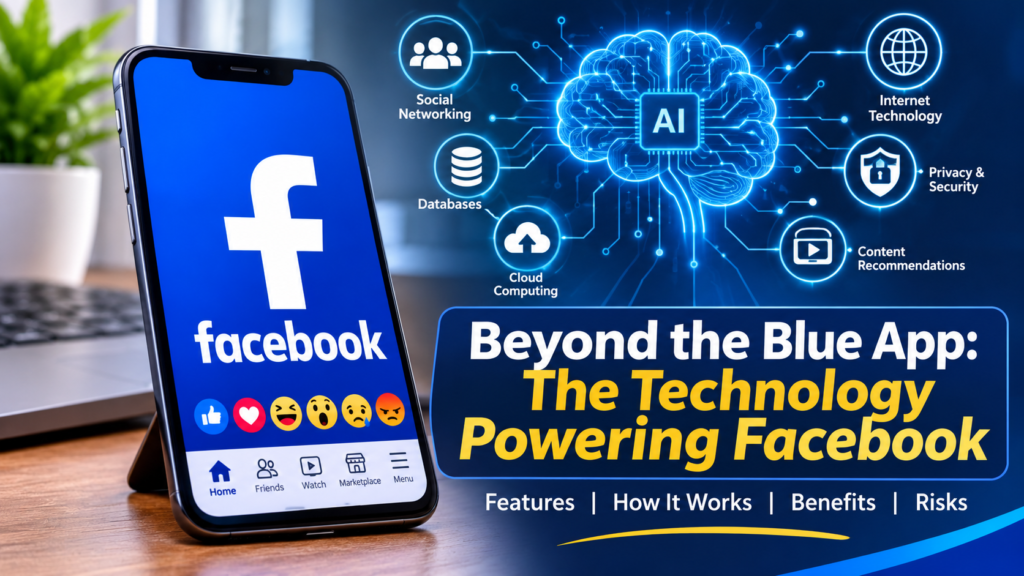
Facebook combines different technologies to support its features. Some of the most important include artificial intelligence, databases, distributed computing and Internet networking.
A. Artificial Intelligence and Machine Learning
Have you ever watched a particular type of video on Facebook and noticed that similar videos keep appearing?
That is one example of how recommendation technology works.
Artificial Intelligence (AI) helps Facebook organize information, make productions, and recommend content that may interest individual users.
Machine Learning, a branch of AI, allows computer systems to identify patterns in data and use those patterns to make predictions.
For example:
- Someone who frequently watches cooking videos will receive more cooking-related recommendations.
- A person who interacts with technology content will discover more technology-related posts.
- Someone who follows football discussions will definitely encounter more football-related content.
These recommendations can depend on several signals, including previous interactions, content characteristics, and user feedback.
However, algorithms do not always understand people’s interests perfectly. Sometimes they recommend irrelevant, repetitive or misleading content.
B. Databases and Data Processing
Every Facebook account generates and interacts with information.
This includes profile details, photographs, comments, messages, and other activities.
Facebook relies on databases and data-processing systems to organize and retrieve information efficiently.
For instance, when you open someone’s profile, the platform retrieves the information you are permitted to see and displays it on your screen.
Without databases, managing the enormous volume of information generated by users would be extremely difficult.
C. Cloud and Distributed Computing
Facebook serves users across different countries, time zones, and internet networks.
It therefore requires extensive computing infrastructure rather than relying on a single computer or server.
Distributed computing allows different connected systems to share workloads and process information.
This helps Facebook manage large amounts of traffic, support its services and deliver content on scale.
D. Computer Networking
Facebook also depends on networking technologies to transfer information between users’ devices and its infrastructure.
When you upload a photograph, watch a video, or send a message, information travels through internet networks using established communication protocols.
Your experience can depend on network coverage, connection speed, device performance, and the size of the content being delivered.
This explains why Facebook may load quickly on a strong broadband connection but struggle when mobile internet connectivity is unstable.
Important Facebook Features and How They Work
Facebook brings several digital functions together in one application. Each feature serves a different purpose.
1. News Feed
The News Feed is the central area where users discover posts from friends, Pages, Groups, and recommended sources.
But, Facebook does not simply display every post in the order it was published.
Its ranking system help determine which eligible content appears more prominently based on different signals and predictions.
2. Facebook Stories and Reels
Stories allow users to share pictures and videos in a temporary format.
Reels, on the other hand, focuses on short-form video content and discovery.
Both features combine media processing, video delivery, and content recommendation technology.
3. Facebook Groups
Groups allow people to connect around common interests, professional activities, educational subjects and community issues.
Students can exchange learning materials, entrepreneurs can discuss business opportunities, and residents can share information about their neighbourhoods.
4. Facebook Pages
Pages provide businesses, organizations, public figures and content creators with a public presence.
A small business in China, for instance, can use a Facebook Page to display products, communicate with customers, publish announcements, and promote its services.
5. Facebook Marketplace
Marketplace connects buyers and sellers through product listings.
Users can browse available items, search by category, and discover listings in supported locations.
However, users should be careful when dealing with unfamiliar sellers. A product listing does not automatically establish that the seller is trustworthy.
6. Messenger
Messenger provides communication features that allow users to exchange messages and, where supported, make voice and video calls.
It demonstrates how social networking platforms can combine communication services with content-sharing and community features.
How Facebook Algorithms Decide What You See
Have you ever opened Facebook to check one post and somehow ended up watching twenty videos about the same subject?
There is a technology explanation for this.
Facebook uses algorithms and recommendation systems to organize content and estimate what individual users may find interesting.
An algorithm is simply a set of instructions that tells a computer system how to perform a particular task.
On Facebook, these systems consider different signals, such as:
- Your interactions: Posts you like, comment on, share, or otherwise engage with.
- Your interests: Topics and content you frequently interact with.
- Your connections: Relationships and interactions involving friends, Pages, and Groups.
- Content information: The type of post, its characteristics and other relevant signals.
- Your feedback: Actions indicating whether you want to see more or less of particular content.
Imagine someone who regularly watches smartphone reviews, follows technology Pages, and participates in discussions about gadgets.
Facebook may predict that similar technology content will be relevant and recommend more of it.
Your Facebook Feed is not simply a collection of everything your friends have posted. It is a personalized selection of content organized by automated ranking systems.
This personalisation can make content discovery easier. It can also limit exposure to different perspectives when users repeatedly engage with similar subjects.
Fortunately, Facebook offers Feed controls and feedback options that allow users to influence some of the content they see.
Benefits of Facebook as a Technology Application
Facebook has changed how people communicate, discover information and promote businesses.
Its usefulness extends beyond personal entertainment.
Here are some important benefits.
1. Communication Across Distances
People can communicate with friends, relatives and colleagues regardless of geographical location.
A family living in North America can maintain contact with relatives abroad through posts, comments, and messaging features.
2. Business Promotion
Facebook gives businesses another way to reach potential customers.
Small business owners can:
- Display their products and services.
- Communicate with interested customers.
- Build an online audience.
- Advertise products to selected audience.
- Receive enquires and customer feedback.
3. Education and Knowledge Sharing
Educational communities use Facebook Groups and Pages to exchange information, share learning resources, and discuss different subjects.
Students can discover tutorials, join study communities, and learn from discussions with other people.
4. Community Building
Facebook allows people with shared interests to find one another.
From professional communities to neighbourhood Groups, the platform makes it easier to exchange information and organize activities.
5. Opportunities for Content Creators
Writers, photographers, educators, and video creators can publish content and build an audience.
For people developing a digital career, Facebook can provide an additional channel for sharing their work and connecting with readers or viewers.
The Risks and Limitations of Facebook
Despite its advantages, Facebook is not without problems.
Like other internet applications, it creates certain privacy, security, and digital well-being challenges.
A. Privacy concerns
People frequently share personal photographs, locations, workplace information and other details without considering who might access them.
Privacy settings help users control the audience for their posts, but they should not assume that everything shared online remains completely private.
B. Scams and Fake Accounts
Scammers sometimes create fake profiles, impersonate businesses, or send messages designed to trick people into transferring money or revealing sensitive information.
Be particularly careful with:
- Investment opportunities promising guaranteed returns.
- Messages requesting verification codes.
- Unfamiliar links claiming you have won a prize.
- Fake business accounts requesting advance payments.
C. Misinformation
Facebook makes it easy to share information, but not everything published on the platform is accurate.
False stories, misleading photographs, and fabricated claims can circulate rapidly.
Before sharing a surprising story, check its original source and look for independent confirmation.
D. Distraction and Excessive Screen Time
Continuous scrolling, notifications and recommended videos can make it difficult to manage time.
What begins as a quick visit to check a notification can easily turn into an extended browsing session.
E. Dependence on the Platform
Businesses that rely entirely on Facebook risk losing access to their audiences if their accounts are compromised, restricted, or affected by platform changes.
Maintaining an independent website and other customer communication channels can reduce this dependence.
How to Use Facebook More Safely
Understanding the technology is important, but knowing how to protect yourself while using it is equally valuable.
Here are practical steps users should follow:
- Enable two-factor authentication: Add an extra layer of protection to your account.
- Use a strong password: Avoid using the same password across multiple online accounts.
- Review your profile settings: Check who can see your posts, personal information, and profile details.
- Avoid suspicious links: Do not open unfamiliar links simply because they arrive through a message from someone you recognize.
- Verify sellers before making payments: Check business details and be cautious of unusual payments requests.
- Be careful about what you share: Avoid publishing sensitive personal information unnecessarily.
- Review account activity: Check for unfamiliar login sessions and secure your account if you notice suspicious activity.
- Manage notifications: Turn off unnecessary notifications to reduce distractions.
Facebook provides tools such as Privacy Check-up to help users review important privacy and security settings.
What Facebook Teaches Us About Modern Technology
Facebook offers a useful example of how different areas of computing can work together to create a single application.
Consider what happens when you upload a photograph.
Your device communicates with Facebook’s infrastructure. The photograph is processed and stored, networking systems deliver the content, and other users can interact with it according to the available permissions.
At the same time, recommendation systems may help determine who discovers the photograph.
One simple action involves several technological processes.
More importantly, Facebook demonstrates that modern technology does not merely store and display information. It can also organize what people discover, influence what receives attention, and shape how digital communities interact.
This is why understanding social media applications is becoming an important part of digital literacy.
Conclusion
Facebook is much more than an application for connecting with friends and sharing photographs.
It is a sophisticated technology platform built around software engineering, artificial intelligence, databases, computer networking and large-scale data processing.
Its features have created opportunities for communication, education, business promotion, content creation, and community building.
Yet, the same technology also raises important questions about privacy, misinformation, online security, and the influence of recommendation algorithms.
Understanding Facebook means looking beyond the posts and videos appearing on your screen. It means recognizing the interconnected technologies making those experiences possible.
Also remember that every scroll, notification, recommendation and interaction is supported by a much more larger technological system.