

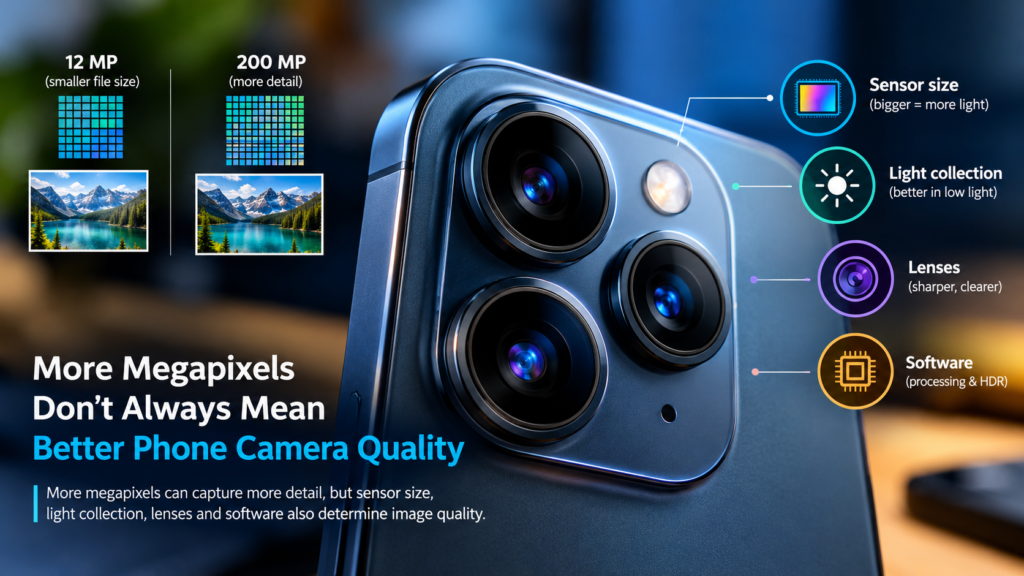
 Why More Megapixels Do Not Always Mean a Better Phone Camera
You walk into a phone shop, and the salesperson starts the usual performance : “This one has a 108MP camera. That other phone? Only 12MP.”
Suddenly, the 12MP phone sounds like it belongs in a museum.
You imagine the 108MP phone capturing every strand of hair, every wrinkle, and even the tiny insect sitting on your neighbour’s window. Surely, more megapixels mean sharper pictures, right?
Not so fast.
That impressive number on the camera box is a little like advertising a car because it has 20 cup holders. Interesting? Perhaps. Proof that it drives better? Absolutely not.
A phone camera with more megapixels can take worse pictures than one with fewer megapixels. The reason has less to do with the number of pixels and more to do with how well the camera collects light, the quality of its sensor and lens, and the software processing everything behind the scenes.
Welcome to the part of smartphone photography that marketing departments would prefer you did not think too hard about.
1. What Are Megapixels, Anyways?
Let us start with the basics.
A pixel is a tiny picture element. Put millions of them together, and you get a digital image.
One megapixel (MP) equals one million pixels. Therefore, a 12MP camera captures an image containing approximately 12 millions pixels, while a 108MP camera can capture an image containing approximately 108 million pixels.
That is nine times as many pixels.
But here is the important distinction: Megapixels measure image resolution, not overall image quality.
Think of a photograph as a giant mosaic made from tiny tiles. A 108-million-tile mosaic can contain more detail than a 12-million-tile mosaic, provided the camera captures that detail in the first place.
If the lens is poor, the lighting is terrible, or the image is blurred by movement, adding more pixels does not magically fix the problem.
It is like recording a concert with nine microphones instead of one, except all nine microphones are covered with socks. Congratulations, you have collected more recordings of muffled noise.
When do more megapixels actually help?
Higher resolution can be useful when you want to:
- Crop heavily into a photograph without losing as much detail.
- Print large photographs.
- Capture fine textures in good lighting.
- Preserve flexibility for editing and reframing.
However, these advantages depend on the lens, sensor, lighting, processing, and how you intend to use the image.
For everyday photographs shared on WhatsApp, Facebook, or Instagram, the difference between a well-made 12MP photo and a well-made 108MP photo may be far less dramatic than the numbers suggest.
Your social media followers are unlikely to inspect your photograph with a microscope. Unless your followers are unusually committed to the investigation.
2. Sensor Size vs Pixel Size: The Real Camera Battle
Here is where things get interesting.
Behind your phone’s camera lens sits an image sensor. Its job is to convert incoming light into electrical signals that can be processed into a photograph.
Think of the sensor as a tray containing thousands or millions of tiny light-catching buckets.
The sensor’s physical size determines how much total space is available for those buckets. Pixel size determines how much space an individual bucket gets.
These are related, but they are not the same thing.
The problem with squeezing in more pixels
Imagine two phone cameras with sensors of the same physical size.
One has 12 million pixels. The other has 108 million.
If both use the same sensor area, the 108MP sensor must divide the area among nine times as many pixels. In a simplified comparison with similar pixel layouts, each pixel gets roughly one-ninth of the area.
That means each individual pixel is much smaller.
Pixel size is commonly measured in micrometres, written as μm. One micrometre is one-millionth of a metre.
For example, a camera might have pixels measuring 1.0μm across, while another uses pixels measuring 0.6μm across.
The smaller pixel occupies less area and generally collects fewer photons during the same exposure, assuming comparable sensor technology and conditions.
And that brings us to the most important ingredient in photography.
Light.
Why sensor size matters
A larger sensor can collect more total light across its surface than a smaller sensor, assuming similar exposure conditions and comparable sensor efficiency.
More collected light can help the camera produce cleaner images, particularly in dim environments.
Consider two scenarios:
- Camera A: A relatively large sensor with fewer, larger pixels.
- Camera B: A smaller sensor packed with many tiny pixels.
Camera B might capture a higher-resolution image in ideal conditions. But Camera A could produce a cleaner photograph in low light because its sensor collects more total light, depending on the technology and lens used.
This is one reason some phones with modest megapixel counts outperform competitors boasting enormous numbers.
However, pixel size alone does not decide the winner. A modern sensor with smaller pixels can still perform very well thanks to improved electronics, sensor design, and image processing.
The takeaway? Do not judge the entire camera by counting its pixels. Look at the size and quality of the sensor, too.
3. Photons, Noise, and Full-Well Capacity: The Tiny Buckets Have Limits
Let us get a little more technical without turning this into a university lecture.
Light arrives at your camera as photons, tiny packets of electromagnetic energy. When photons reach the sensor, they can generate electrical charges that represent the brightness and colour information in a scene.
In simple terms, the sensor counts light and turns it into data.
But light behaves a little like an unpredictable crowd. Even if the brightness stays constant, the exact number of photons arriving at each pixel varies. This creates a type of randomness called shot noise.
The fewer photons the camera collects, the more noticeable this noise can become relative to the useful signal.
That is why a photograph taken in a dim restaurant may look grainy, muddy, or strangely blotchy. Your camera is not necessarily broken. It may be struggling to distinguish useful image information from noise.
What is full-well capacity?
Each pixel has a limited ability to hold electrical charge before it reaches saturation. This limit is called its full-well capacity.
Picture each pixel as a bucket.
A tiny bucket fills quickly. A larger bucket can hold more water before overflowing.
Similarly, a pixel with greater full-well capacity can hold more photo-generated charge before saturating, although actual capacity depends on the sensor’s design and electronics.
What does that matter?
When a pixel saturates, it can no longer accurately distinguish additional brightness. Very bright areas may lose detail, turning a cloudless patch of sky into a white blob or a lamp into a glowing circle.
Larger pixels often have higher full-well capacity, but pixel area is not the only factor. Sensor architecture, pixel design, and conversion technology also influence the result.
The low-light advantage
When light is scarce, a camera needs to gather enough photons to differentiate details from noise.
A camera with an efficient sensor, a good lens, and effective noise reduction will preserve details better than a camera that merely boasts more megapixels.
Imagine trying to hear a friend whispering in a noisy restaurant. Buying a recorder that stores the whisper in more digital pieces does not make the whisper louder or clearer.
You need a better way to capture the original signal.
That is the difference between collecting more pixels and collecting better image information.
4. Your Camera’s ISP: The Invisible Editor
Suppose your sensor has captured millions of measurements. Are those measurements immediately ready to become a beautiful photograph?
Not quite.
Modern Smartphone rely on an Image Signal Processor or ISP, along with other processing hardware and software, to transform raw sensor data into a finish image.
Think of the ISP as the editor who receives a rough photograph and tries to make it look its best.
Its work can include:
- Demosaicing: Reconstructing full-colour information from measurements captured through a colour-filter array.
- Noise reduction: Reducing distracting grain while trying to preserve useful detail.
- Sharpening: Enhancing edges to make details appear more defined.
- White balance: Adjusting colors so that whites and other objects look natural under different lighting.
- Tone mapping: Compressing the brightness range so shadows and highlights can be displayed attractively.
- Colour correction: Adjusting colour reproduction to produce a pleasing and reasonably accurate result.
These operations can make a significant difference to the final image.
Two phones with similar megapixel counts can produce noticeably different photographs because their sensors, lenses, processing pipelines, and turning differ.
But there is a catch.
Processing can improve the information captured by the camera. It cannot reliably recover detail that was never recorded.
Excessive sharpening can make edges look artificial. Aggressive noise reduction can turn hair, skin, and foliage into smooth, waxy patches.
Sometimes a phone makes a photograph look impressive on its screen by sacrificing subtle details.
It is the photographic equivalent of applying so many beauty filters that your face becomes a completely different person.
Computational photography: when one photo is not enough
Modern phones go beyond processing a single exposure.
Computational photography combines algorithms, multiple frames, and sometimes different exposures to produce an image that looks better than a straightforward sensor capture.
For example, when you take a night photograph, your phone may capture several frames and combine Information from them. It can align the frames, reduce noise, recover more shadow detail, and manage bright highlights.
Portrait mode may estimate depth to separate the subject from the background. HDR photography can combine Information from differently exposed frames to handle bright skies and darker foregrounds.
These techniques can make a 12MP photograph look remarkably good.
However, computational photography is not magic. Moving subjects can create ghosting, poor depth estimates can blur the wrong edges, and excessive processing can make a scene look unnatural.
The quality of the algorithms matters just as much as their existence.
5. Pixel Binning: How a 108MP Camera Produces a 12MP Photo
Now for one of the most confusing smartphone camera tricks.
You buy a phone advertised with a 108MP camera. You open the camera app, take a photograph, and discover that the resulting image is only 12MP.
Did nine-tenths of your camera disappear?
No. Meet pixel binning.
Pixel binning is a technique that combines information from groups of neighbouring sensor pixels to produce a lower-resolution output.
A common example is 9-to-1 binning, in which groups of nine pixels contribute to one output pixel. A 108MP sensor can therefore produce an image of approximately 12MP.
Here is the arithmetic:
108 million sensor pixels ÷ 9 =12 million output pixels.
Simple enough.
But why would a phone throw away eight pixels out of every nine when you paid for all 108 million?
Because the camera is not necessarily throwing away their information. It is combining measurements to make a more useful final image.
Why combine pixels?
Imagine nine tiny buckets collecting rain.
Each bucket captures a small amount. Combine their collected information, and you can obtain a stronger measurement of the light falling across that group.
In simplified terms, binning can improve the signal-to-noise ratio compared with treating each small pixel’s measurement separately, depending on how the sensor combines the signals and the noise characteristics involved.
That can help produce cleaner photographs, especially in low light.
The phone also has fewer output pixels to process and store, which can reduce file sizes and processing demands.
Does binning make the photo better?
It can, but the result depends on the sensor and processing pipeline.
A binned 12MP image may look cleaner than a full-resolution 108MP image taken under the same conditions, particularly in challenging light. The full-resolution image may instead preserve finer detail when lighting is excellent.
And here is subtle but important distinction: Pixel binning does not automatically turn nine tiny physical pixels into one physically larger pixel. The sensor’s physical layout remains the same. The camera is combining their their information.
Some sensors perform binning directly in hardware; others use different readout and processing arrangements.
Also, a 108MP sensor does not guarantee that every photograph will use the full resolution. Your camera app may select a lower-resolution mode by default and reserve full-resolution capture for a special setting.
So yes, that 108MP label can be technically accurate while the camera routinely saves 12MP photographs.
Marketing is not lying about the number. It is simply hoping you will not ask what the number actually mean.
6. The Lens: The Camera Component Nobody Brags About Enough
Even a superb sensor cannot compensate fully for a poor lens.
The lens focuses light onto the sensor. Its optical quality affects sharpness, contrast, distortion, and how well fine details are resolved.
A lens that struggles to resolve fine detail may prevent a high-resolution sensor from delivering its full potential.
It is like buying a high-definition television and feeding it a blurry video. The screen has plenty of pixels, but the source material does not contain enough useful detail.
Lens aperture matters, too.
A wider aperture, represented by a smaller f-number, can let more light reach the sensor for a given exposure time. This can be useful in low light, although lens quality, depth of field, focus, and other factors also matter.
Optical image stabilization (OIS) can reduce blur caused by hand movement, particularly in low light when the camera needs a longer exposure.
And auto focus quality determines whether the subject is actually in focus.
A 200MP camera that misses focus has a rather impressive number of blurry pixels.
7. Why a 12MP Camera Can Beat a 108MP Camera
Imagine two smartphones: One has a 12MP camera, while the other boasts 108MP. You might expect the second phone to win every photography contest. Not necessarily.
A 12MP camera can take better photos if it has a larger, more capable sensor, a sharper lens, better stabilization, and smarter image processing. These features help it capture light, preserve details, And produce clearer images, especially in low-light conditions.
Meanwhile, a 108MP camera may capture more detail in bright lighting, but its smaller pixels can struggle when light is limited.
The bottom line? Megapixels determine image resolution, not overall image quality. A camera is only as good as the technology working behind those millions of pixels.
8. What Should You Check Before Buying a Camera Phone?
If you are shopping for a new smartphone, look beyond the megapixel count.
1. Sensor size and quality
A larger sensor can offer advantages in light collection, but compare actual sensor specifications and reviews rather than relying on size alone.
2. Low-light performance
Look at photographs taken at night or indoors. Check whether faces, hair, and other fine details remain clear without excessive grain or smoothing.
3. Real-world camera samples
Compare photographs taken in similar conditions. Pay attention to detail, exposure, focus, colors, and how well the phone handles difficult lighting.
4. Image processing
Check skin tones, bright skies, shadows, and whether the camera makes photographs look natural or unnaturally sharpened.
5. Lens quality and stabilization
Good optics and optical stabilization can make a practical difference, especially when photographing moving subjects or shooting in dim conditions.
6. Video performance
Check resolution, frame rates, stabilization, autofocus, and sound quality. A high-megapixel still camera does not automatically mean excellent video.
7. Reviews that compare the actual images
Whenever possible, examine full-resolution samples from trusted reviewers. Marketing specifications tell you what a manufacturer claims; photographs show you what the camera can actually do.
Final Verdict: Stop Counting Pixels and Start Looking at Pictures
Megapixels are useful. They tell you something important about a camera’s resolution, and higher resolution can preserve more detail when the rest of the camera system can capture it.
But they do not tell the whole story.
Sensor size affects how much light a camera can collect. Pixel size influences the amount of light reaching each pixel. Full-well capacity affects how much charge a pixel can hold before saturation. The lens determines how effectively light is focused, while the ISP and computational photography algorithms turn sensor measurements into the photograph you see.
Pixel binning can also help high-resolution sensors produce cleaner, lower-resolution images.
All these pieces work together.
So the next time a salesperson tells you that a phone is automatically better because it has 108MP instead of 12MP, remember the tiny clowns in the tiny car.
You can squeeze in more of them. That does not mean the car gets bigger, the road gets smoother, or the journey becomes more enjoyable.
A great phone camera is not the one that counts the most pixels. It is the one that captures the best paragraph.